
Local AI Meeting Transcription, Built for Privacy. No Cloud. No Subscriptions.
Convert both online and in-person meetings into speaker-labeled transcripts.
Generate completly custom AI summaries using our powerful API.
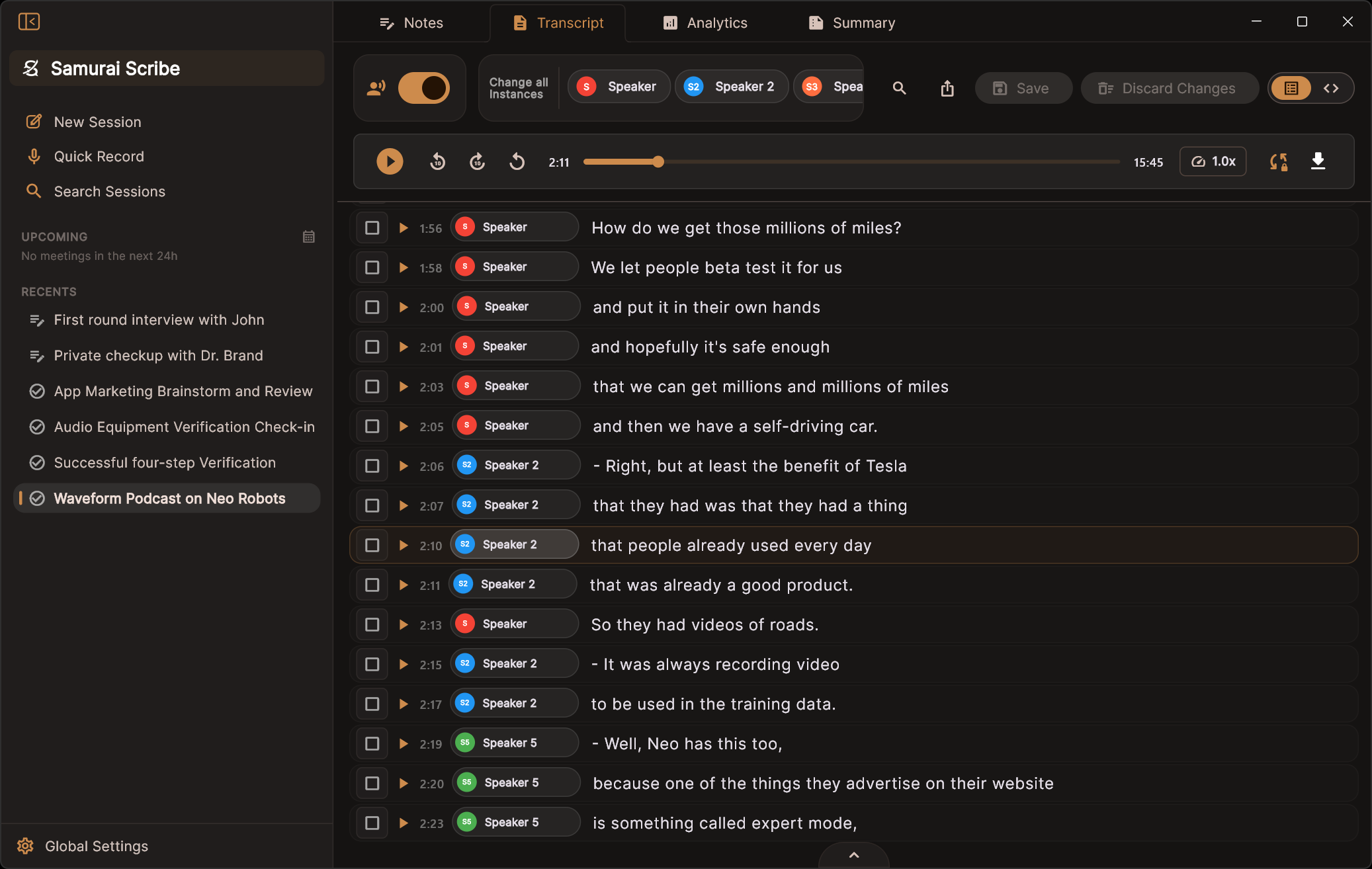
Powerful In-Room Speaker Detection and voice recording
Handles in-person meetings
On-device speaker detection using state-of-the-art segmentation models tracks individual speaker turns locally.
Mic vs System channel isolation
Allows for further cleanup of overlapping audio, making local speech-to-text resolution extremely high quality.
No meeting bots
Records locally and privately on your machine without requiring external bots to join your calls.
Echo cancellation
Direct loopback captures filter speaker reflections, preventing audio bleed and echoes during calls.
Your meetings are files. In your folder. On your disk.
Every meeting is a folder of Markdown and audio, in a location you pick. Written as the meeting is processed. Readable by anything.
The files are the truth
Delete the app's index and nothing is lost — it rebuilds from the folder. Move it to another drive, keep several, back it up however you already do.
Obsidian, or any editor
Point it at an Obsidian vault and it writes wikilinks and callouts to match. Edit a meeting anywhere and the change is picked up — even edits made while the app was closed.
Feed it to whatever comes next
Claude Code, a shell script, your own tooling — plain Markdown in a folder is already readable by all of it. No API, no export step.
Meetings/
├── 2026-08-01 Design Review/
│   ├── Notes.md
│   ├── Transcript.md
│   ├── Action Items.md
│   ├── _meeting.json  # <------ Meeting metadata
│   └── playback.m4a   # <------ Recording
├── 2026-07-30 Sprint 14 Planning/
├── 2026-07-28 Customer Interview - Acme/
└── 2026-07-24 Architecture Deep Dive/▐▛███▛█ ▝▜██████▀ ▝▝ ▝▝
Orchestrate your AI meeting summaries using a powerful Scripting API For however you like to slice it.
Write lightweight scripts using the Rhai engine to parse transcripts, filter speakers, and map-reduce long conversations directly on your device. A script reads any number of notes you attach, in your order, alongside the transcript and the linked calendar event's agenda — and writes as many documents as it likes, each opening as its own tab as it streams. Below: the actual default template that ships with the app plus two custom ones, each next to its real, unedited output.
Writing, testing and running custom scripts is free.
// ═══════════════════════════════════════════════════════════════════
//  Samurai Scribe — Default Summarization Template (v1.0)
// ═══════════════════════════════════════════════════════════════════
//
//  HOW TO CUSTOMIZE
//  ----------------
//  Everything you'll normally change lives in ZONE 1 below:
//    • The summary itself ... edit the text in `summary_template()` — the
//                             "## " sections are written out inline, so you can
//                             reword, add, remove, or reorder them in place.
//    • Long meetings ........ edit `chunk_instruction()` (per-part notes).
//    • The title ............ edit `title_instruction()`.
//    • Model temperature .... edit the TEMPERATURE constant.
//
//  ZONE 2 ("THE ENGINE") runs the pipeline — chunking long meetings, cleanup,
//  and titling. You can read it, but you rarely need to touch it.
//
//  (Tip: Rhai functions can't read outside variables, so the editable text is
//  wrapped in small functions that just `return` a string. Edit inside them.)
// ═══════════════════════════════════════════════════════════════════


// ═══════════════════════════════════════════════════════════════════
//  ZONE 1 — THE PROMPTS  (this is the part you edit)
// ═══════════════════════════════════════════════════════════════════

// Lower temperature → more consistent, less embellished notes (0.0–1.0).
const TEMPERATURE = 0.3;

// The instructions the model follows to write the notes. This reads top-to-
// bottom like the notes it produces — edit the wording, the sections, or the
// rules directly. To add a section, just write another "## Heading" block.
fn summary_template() {
    `You are a professional meeting-notes writer. Write clear, well-structured meeting notes in Markdown.

Use the sections below, in this order. Include a section ONLY when the meeting actually produced that content — otherwise leave it out entirely (no empty headings, no placeholders):

## Overview
A 2-4 sentence plain-language summary of the meeting's purpose and outcome. Always include this section.

## Discussion
Concise bullet points covering the main topics and key details (names, numbers, dates). Keep each bullet to one idea.

## Decisions
Each concrete decision that was reached, stated plainly. Skip this section if no decisions were made.

## Action Items
One Markdown checkbox per task: - [ ] **Owner** — task. Add a due date only if one was explicitly stated. Skip this section if there are none.

## Open Questions
Genuinely unresolved questions or items deferred to later. Skip this section if there are none.

Rules:
- Begin your reply immediately with the first heading. No title, preamble, or sign-off, and never comment on the notes themselves.
- Never write "None", "N/A", or any empty placeholder under a heading — omit the heading instead.
- Never add meta-commentary about what is missing or implied (e.g. "(no due date stated)"). State only what was actually said.
- Write in neutral third person — no "I", "we", or "you".
- Refer to people by name when the name is known; otherwise use their speaker label.
- Use ONLY what is in the transcript and the user's meeting notes if present. Do not speculate, embellish, or invent facts, dates, numbers, or names. If something is unclear, leave it out.
- Be specific and factual; avoid filler like "various topics were discussed".`
}

// Long meetings are summarized in parts first; this guides each part (the "map"
// step). Its output feeds the final summary, so keep the details.
fn chunk_instruction() {
    `You are taking structured notes on ONE part of a longer meeting. From the transcript segment below, extract the important content as concise Markdown bullet points, preserving:
- key discussion points and concrete details (names, numbers, dates)
- decisions that were made
- action items or commitments (note who owns each)
- open questions or deferred items

Keep the specifics; do not over-condense. Add no introduction or commentary — begin directly with the bullet points.`
}

// How the meeting title is generated from the finished summary.
fn title_instruction() {
    `Create a concise, descriptive title for this meeting in 3 to 6 words based on the summary below.
Output ONLY the title text — no quotes, no labels, no trailing punctuation, no markdown, no words like 'meeting' or 'summary'.`
}


// ═══════════════════════════════════════════════════════════════════
//  ZONE 2 — THE ENGINE  (runs the pipeline; rarely needs editing)
// ═══════════════════════════════════════════════════════════════════

fn run(ctx) {
    // `ctx` is the run; `ctx.meeting` is the meeting it's about. Alias it once
    // so the rest of the script stays terse (ctx.meetings holds all meetings in
    // scope — length 1 today).
    let meeting = ctx.meeting;
    let transcript = meeting.transcript;
    let intermediate = meeting.intermediate;
    let summary = meeting.summary;
    let title = meeting.title;
    let llm = meeting.llm;

    // User notes typed alongside the meeting steer the summary when present.
    let notes_block = build_notes_block(meeting.notes.text);

    // Split long transcripts into chunks that fit ~80% of the context window.
    let chunk_size_chars = llm.context_window * 0.8 * 4;
    if chunk_size_chars <= 0 { chunk_size_chars = 8192; }
    let chunks = chunk_turns(transcript.turns, chunk_size_chars);

    if chunks.len() <= 1 {
        // Short meeting: summarize the whole transcript in one pass.
        llm.write(summary, summary_template() + notes_block + "\n\nTranscript:\n" + transcript.text());
    } else {
        // Long meeting: note each part (map), then synthesize them all (reduce).
        for i in 0..chunks.len() {
            intermediate.append(`## Part ${i + 1} of ${chunks.len()}
`);
            llm.write(intermediate, chunk_instruction() + "\n\nTranscript segment:\n" + chunks[i]);
            intermediate.append("\n\n");
        }
        llm.write(summary, summary_template() + notes_block
            + `

The text below is rough notes from consecutive parts of one meeting (ignore any "Part N" headers — it is all one meeting). Synthesize them into a single cohesive, de-duplicated set of notes that follows the structure above.

Notes:
` + intermediate.text);
    }

    // Drop any empty/placeholder sections the model emitted anyway, then title it.
    summary.text = clean_summary(summary.text);

    // Auto-generate a title from the summary — but never clobber a title the
    // user renamed by hand (meeting.has_custom_title).
    if !meeting.has_custom_title {
        title.text = "";
        llm.write(title, title_instruction() + "\n\nSummary:\n" + summary.text);
    }

    llm.unload();   // free GPU/RAM now rather than waiting for the idle timer
}

// Builds the high-priority steering block from the user's notes ("" if none).
fn build_notes_block(notes) {
    let trimmed = notes;
    trimmed.trim();                 // Rhai trim() mutates in place
    if trimmed == "" { return ""; }
    return `

--- USER'S MEETING NOTES (high priority) ---
${notes}
--- END NOTES ---

Treat the notes above as the user's priorities: ensure every point they raised is addressed and use them to shape the structure and emphasis of the summary. Where the notes and transcript conflict on facts (names, spellings, decisions, numbers), trust the notes.`;
}

// Removes any "## " section whose body is empty or only a placeholder such as
// "None"/"N/A". Non-destructive: text without "## " headings is returned as-is,
// and an empty input returns "".
fn clean_summary(text) {
    let lines = text.split("\n");
    let n = lines.len();
    let out = [];
    let i = 0;
    while i < n {
        let line = lines[i];
        if is_heading(line) {
            // Collect this section's body until the next heading or end.
            let body = [];
            let j = i + 1;
            while j < n {
                if is_heading(lines[j]) { break; }
                body.push(lines[j]);
                j += 1;
            }
            let keep = false;
            for b in body {
                if !is_placeholder_line(b) { keep = true; break; }
            }
            if keep {
                out.push(line);
                for b in body { out.push(b); }
            }
            i = j;
        } else {
            out.push(line);
            i += 1;
        }
    }
    let result = "";
    for k in 0..out.len() {
        if k > 0 { result += "\n"; }
        result += out[k];
    }
    result.trim();          // Rhai trim() mutates in place
    return result;
}

// True when a line is a "## " section heading (tolerant of leading whitespace).
fn is_heading(line) {
    let t = line;
    t.trim();
    return t.starts_with("## ");
}

// True when a line carries no real content (blank, or a placeholder like
// "None", "N/A", "No decisions were made", once bullets/markup are stripped).
fn is_placeholder_line(s) {
    let t = s.to_lower();
    t.trim();
    if t == "" { return true; }
    t.replace("- [ ]", " ");
    t.replace("- [x]", " ");
    t.replace("-", " ");
    t.replace("*", " ");
    t.replace("_", " ");
    t.replace("#", " ");
    t.replace(".", " ");
    t.replace(":", " ");
    t.replace("/", " ");
    t.trim();
    if t == "" { return true; }
    if t == "none" || t == "n a" || t == "na" || t == "nothing" || t == "not applicable" {
        return true;
    }
    if t.contains("no decisions were made") || t.contains("no decisions made")
        || t.contains("no action items") || t.contains("no open questions")
        || t.contains("none mentioned") || t.contains("none noted")
        || t.contains("none identified") || t.contains("none recorded")
        || t.contains("none at this time") {
        return true;
    }
    return false;
}

fn chunk_turns(turns, max_chars) {
    let chunks = [];
    let current = "";

    for i in 0..turns.len() {
        let t = turns[i];
        let line = t.speaker + ": " + t.text + "\n";

        if (current.len() + line.len()) > max_chars && current.len() > 0 {
            chunks.push(current);
            current = "";
        }
        current += line;
    }

    if current.len() > 0 {
        chunks.push(current);
    }
    return chunks;
}

fn filter_turns(turns, speaker_name) {
    let filtered = [];
    for i in 0..turns.len() {
        let t = turns[i];
        if t.speaker == speaker_name {
            filtered.push(t);
        }
    }
    return filtered;
}
// ── Chapter Markers ──────────────────────────────────────────────
// Turns a long recording into timestamped chapters — ready to paste
// into show notes, a YouTube description, or meeting minutes.
const TEMPERATURE = 0.3;
fn chapter_instruction() {
`Above is a section of a timestamped transcript. List the major
topic changes in it as chapter markers, in chronological order.
STRICT OUTPUT FORMAT — one chapter per line, nothing else, e.g.:
[12:30] Opening banter and news roundup
Rules:
- Copy the [MM:SS] timestamp of the line where each topic starts.
- Title each chapter in 3-7 words.
- One chapter roughly every 5-15 minutes; only genuinely new topics.
- Do NOT summarize, describe, or add headings, notes, or commentary.`
}
fn run(ctx) {
let meeting = ctx.meeting;
let llm = meeting.llm;
let summary = meeting.summary;
// Timestamped transcript, chunked to fit the context window.
// (Timestamped lines run ~3 chars per token, so budget conservatively.)
let stamped = meeting.transcript.text(#{ timestamps: true });
let chunks = chunk_lines(stamped, llm.context_window * 0.5 * 4);
summary.text = "## Chapters\n\n";
for i in 0..chunks.len() {
llm.write(summary, chapter_instruction()
+ "\n\nTranscript:\n" + chunks[i]);
summary.append("\n");
}
llm.unload();
}
// Split text on line boundaries into chunks of at most max_chars.
fn chunk_lines(text, max_chars) {
let chunks = [];
let current = "";
for line in text.split("\n") {
if (current.len() + line.len() + 1) > max_chars && current.len() > 0 {
chunks.push(current);
current = "";
}
current += line + "\n";
}
if current.len() > 0 { chunks.push(current); }
return chunks;
}// ── Speaker Scorecard ────────────────────────────────────────────
// Talk-time plus a short digest of what each person brought to the
// conversation — who drove which topics, and where they stood.
const TEMPERATURE = 0.3;
fn speaker_instruction(name) {
`The transcript excerpts below are everything ${name} said in a
longer conversation. In 2-3 tight bullet points, characterize what
this speaker contributed: the topics they drove, positions they took,
and anything they committed to. Neutral third person. Begin directly
with the bullets — no preamble.`
}
fn run(ctx) {
let meeting = ctx.meeting;
let transcript = meeting.transcript;
let llm = meeting.llm;
let summary = meeting.summary;
summary.text = "## Speaker Scorecard\n\n";
let budget = llm.context_window * 3; // chars of quotes per speaker
for s in transcript.speaker_stats {
let pct = s.speaking_percentage.round().to_int();
summary.append("### " + s.name + " — " + pct + "% of talk time\n");
let said = "";
for t in filter_turns(transcript.turns, s.name) {
if said.len() > budget { break; }
said += t.text + "\n";
}
llm.write(summary, speaker_instruction(s.name)
+ "\n\nWhat they said:\n" + said);
summary.append("\n\n");
}
llm.unload();
}
fn filter_turns(turns, speaker_name) {
let filtered = [];
for t in turns {
if t.speaker == speaker_name { filtered.push(t); }
}
return filtered;
}Waveform Podcast Tech News and Candy Tasting
↑ title auto-generated by the script
Overview
The Waveform podcast team discussed recent tech news including disappointing sales for Apple's iPhone Air, updates on the One X Neo robot and Adobe Max features, and new product launches from Microsoft and Nothing. The episode concluded with a blind candy tasting session that resulted in specific rankings of various sweets.
Discussion
- iPhone Air Sales: Production volume was cut to less than 10% of forecasts for the first month; Marques noted sales curves differ between enthusiasts and normal buyers, though anecdotal evidence from NYC suggests high visibility.
- One X Neo Robot Specs: The device is a 5'6" humanoid weighing ~66 lbs with fabric body parts, camera eyes, microphone ears, and a 4-hour battery life requiring auto-docking charging.
- Robot Autonomy Limitations: Demonstrations are primarily tele-operated via VR headsets; only two clips were labeled autonomous (answering doors, taking empty glasses). The unit cannot use stoves due to safety risks or handle sharp objects well.
- Adobe Max Updates: Lightroom received assisted culling features using image recognition and automatic dust removal. Photoshop now supports multiple generative models including Google's "NanoBanana" and integrated Topaz Upscale AI, plus a new "Harmonize" lighting feature.
- Microsoft Co-Pilot Easter Egg: New 3D characters resembling "Luma" from Super Mario Galaxy appear in Windows; tapping them repeatedly triggers a transformation into Clippy before disappearing.
- Affinity Suite Promotion: iPad graphic design apps are currently free ($0), with the promotion potentially ending soon.
- Nothing Phone Lineup Pricing: The Nothing 3A Lite launched at approximately $290, while the standard Nothing Phone 3 is ~$799 and the CMF Phone 2 Pro (sub-brand) costs $279.
- BOOX Palma 2 Pro Specs: This e-reader features a 6.13-inch color E Ink display, 8GB RAM, and a SIM tray that doubles as an SD reader; it is sold with an Inksense Plus Bundle for an additional $30.
- Candy Blind Test Results: Ooze Tube Liquid Candy (Green Apple) ranked #1 despite burning the throat; T-Berry Gum was #2; Bubble Juice finished last at #12 due to a soapy taste, though it smelled like birthday cake initially.
- Trivia Answers: The Vivo X5 Max released in December 2014 had a thickness of 4.8mm. Yannis Antetokounmpo and Steph Curry were identified as NBA superstars with deals involving Google/Fitbit. Daniel Eck was the former CEO of YouTorrent before its acquisition.
- Host Scores: Andrew ("the skeleton") led with 9 points, followed by Marquez at 8 points, and David at 5 points.
Decisions
The hosts will consume remaining unused candies (Kit Kat, Reese's, Hershey's, Twizzlers) after the recording session concludes. The episode teased a future segment titled "Tech-vember" for November where hosts plan to enjoy lunch with better candies than Fun Dip.
Action Items
- ☐ Hosts — eat remaining good candy (Kit Kats, Twizzlers, Hershey's).
Speaker Scorecard
Speaker — 15% of talk time
- The speaker drove the conversation through an extensive blind taste test segment, introducing diverse candy items ranging from standard Halloween treats to obscure products like "Boston Baked Beans" and liquid candies, while actively managing group consensus on rankings despite their own strong preferences for specific sweets like Almond Joy.
- They took a critical position regarding tech product design flaws, specifically mocking the Nothing phone's non-functional pull-tab aesthetic that mimics functionality, as well as highlighting safety concerns with NEO robots (e.g., moisture damage warnings contradicting outdoor usage videos) and criticizing LLM-driven interfaces for their potential to be confusing or dangerous.
- The speaker committed to facilitating a collaborative ranking exercise where hosts must agree on candy tiers without knowing future items, while also sharing personal anecdotes about battery life struggles due to train delays and promoting the temporary free availability of Affinity iPad apps.
Speaker 2 — 4% of talk time
- Speaker 2 drove the conversation through personal anecdotes about their history as an internet "pirate" and current streaming habits, while also sharing trivia facts (such as Daniel Eck's brief tenure at What's Torrenting Company) to entertain the group during game segments involving bubble blowing.
- They consistently took a neutral or supportive position on technical topics, acknowledging that certain startup features are impressive even if not currently marketed, and they actively encouraged other participants by offering hints for trivia questions about NBA players with Google deals.
- The speaker committed to engaging in the lighthearted banter regarding candy preferences (specifically coconut) and accepted points awarded during the game when their partner correctly identified answers or provided helpful clues.
Speaker 3 — 22% of talk time
- Analyzed and critiqued recent tech products with a focus on their limitations: Speaker 3 questioned the utility of tele-operated humanoid robots lacking autonomy or safety features (like handling sharp objects), noted that "Lock Glimpse" was enabled by default despite previous community backlash, and compared new Nothing phone models to existing CMF designs while highlighting specific software quirks.
- Participated in a detailed Halloween candy ranking segment, offering candid opinions on various sweets; they expressed strong preferences for Twix and Blue Mango gum, criticized the texture of chocolate dots and bubble juice (which caused physical mess), and debated the merits of almond joy against other treats like Laffy Taffy.
- Engaged in lighthearted banter regarding pop culture references, including jokes about Apple's "iPhone Air," Microsoft Clippy nostalgia, and a recurring running gag involving skeleton/minion imagery from another podcast guest (Neo), while also sharing personal anecdotes about using Life360 trackers for family safety.
Speaker 4 — 35% of talk time
- Analyzed and contextualized conflicting iPhone Air sales data, arguing that a 90% production cut likely reflects normal post-launch demand curves rather than product failure, while also critiquing the industry trend of selling "dreams" for unfinished AI robots like Neo by highlighting their reliance on tele-operation.
- Provided detailed commentary on Nothing Phone's confusing hardware hierarchy and design choices (such as visible screws that cannot be opened), compared its utility against cheaper CMF alternatives, and participated in a blind taste test to rank Halloween candies from best to worst.
- Adopted the persona of an Apple supply chain expert ("Tim Cook hat") to explain logistics forecasting for new devices and expressed skepticism regarding early AI hardware products until they achieve full autonomy without remote human intervention.
Speaker 5 — 21% of talk time
- Tech Product Analysis & Commentary: The speaker provided detailed reviews and feature breakdowns of new hardware, including a "fishing vest" costume prop for an audio show, the rumored iPhone Air (discussing battery life trade-offs), Adobe's Creative Cloud updates like Lightroom's AI culling and Photoshop's multi-model generative fill, Microsoft Co-Pilot's 3D character assistant Meeko, and Nothing Phone budget lines; they also offered a deep dive into the BOOX Palma 2 Pro e-reader, highlighting its SIM card tray capability for phone-like functionality, color E-Ink display, MagSafe case integration, and writing pen latency.
- Industry Observations & Skepticism: They took positions questioning the viability of high-cost AI robots that rely on consumer homes to generate training data due to insufficient lab resources, compared this strategy unfavorably to Tesla's approach with existing vehicle fleets, expressed hesitation about spending $1,000 on a new phone without testing it first, and critiqued Adobe Max for lacking immediate major feature releases despite recent updates.
- Commitments & Casual Contributions: The speaker committed to unboxing the BOOX Palma 2 Pro immediately after receiving it that morning with plans to test its SIM capabilities as a potential replacement or supplement to their phone; they also volunteered to record a separate clip of twirling around for Adam, agreed to let viewers decide which character was a minion in the segment, and participated in casual banter regarding tech jokes (iCloud puns), candy preferences, and sports trivia.
Chapters
[00:18] Spooky Halloween podcast intro and candy jokes
[01:06] iPhone Air sales updates and new robot announcement
[01:39] Hosts explain their elaborate Halloween costumes
[04:27] History of failed Apple mini phones leads to current analysis
[05:58] Low production numbers for the ultra-thin iPhone Air
[07:48] Discussion on enthusiast demand versus base model sales
[13:39] YouTube custom like button animations and channel types
[16:24] Testing if video tags trigger specific animation buttons
[17:35] One X Neo robot announcement and available pre-order details
[24:16] NEO robot training data and AI product problem
[30:28] FAQ limitations on cooking and cleaning tasks
[35:23] Safety concerns for elderly users with current tech
[37:19] Adobe Max conference overview and new features
[38:24] Lightroom assisted culling and color tools
[42:06] Photoshop generative fill model options
[45:24] Microsoft Co-Pilot Meeko character update
[47:15] Halloween trivia question about thin phones
[49:18] Life360 app and Tile tracker features
[50:32] LinkedIn hiring tools for small businesses
[51:31] Nothing Phone battery life discussion
[52:57] Nothing 3A Lite product hierarchy analysis
[58:26] Glyph interface design philosophy review
[01:00:26] Lock Glimpse feature controversy details
[01:02:34] BOOX Palma 2 Pro e-reader specifications
[01:09:41] Miro AI workspace platform promotion
[01:10:37] Zapier automation and business integration
[01:11:42] T-Mobile iPhone 17 Pro commercial read
[01:12:16] Blind Halloween candy ranking segment
[01:14:58] Ranking candy number five and discussing the blue dude
[01:20:19] Evaluating Tixie Rolls and comparing them to other candies
[01:23:36] Reviewing Terry's Dark Chocolate Orange from across the pond
[01:27:34] Trying Fundip, a candy dip made of sugar sticks and powder
[01:29:58] Tasting Milk Duds which are described as very chewy candies
[01:32:46] Sampling edible bubble juice that tastes like birthday cake soap
[01:37:04] Halloween candy blind ranking segment begins
[01:38:59] Evaluating Ooze Tube liquid green apple candy
[01:44:02] Spooky trivia question about thin smartphones
[01:46:33] Basketball trivia regarding NBA players with Google deals
Every tab is real. The first is the exact default template that ships with the app — on a transcript this long its map-reduce path kicks in automatically; the other two are small custom scripts written against the same API (timestamped chapter markers, and a per-speaker talk-time digest). Each output is the unedited result of running its template on the same 110-minute, five-speaker podcast episode (22,636 transcribed words) — transcribed, speaker-separated, summarized, and titled entirely on one machine (Whisper + qwen3.5:9b via Ollama).
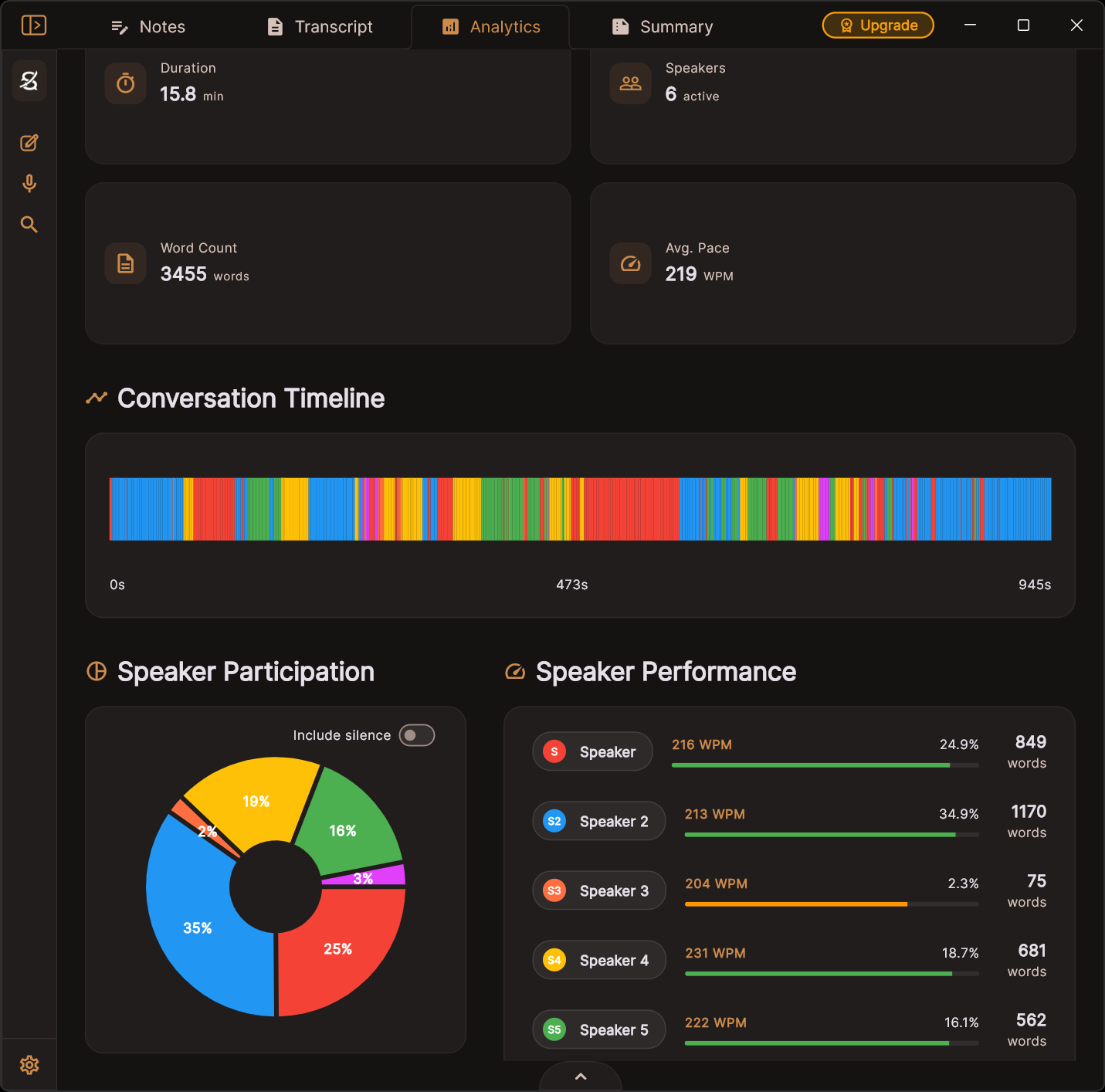
Instant Meeting Analytics
Analytics are revealed instantly after transcription. Displays speaker talk-time, word counts, and meeting duration at a glance.
Other Features
Calendar Integration
Sync your Google Calendar or ICS feed. See upcoming meetings in the sidebar, prep notes before they start, and auto-link sessions to events.
Global Search
Search across all sessions, transcripts, and notes instantly with a unified search overlay.
Nothing to Export
Your transcripts, summaries and notes are already Markdown files in your folder, written as the meeting is processed. Individual transcripts, analytics and audio can still be saved anywhere you like.
Clean, Familiar Interface
A tidy sidebar-and-session layout inspired by the AI tools you already use, with Notes, Transcript, Analytics, and Summary a tab away.
Modify Transcripts & Speakers
Find & replace across transcripts and notes, rename speakers, or rewrite the entire transcript directly in text mode.
Save Settings to Profiles
Save selected models, speaker counts, summarization scripts, and audio filter preferences to reusable profiles for different applications.
Live Transcript Preview
See a real-time transcript preview during your meetings using a lightweight model before full processing.
Any Language, Optionally Translated
Tell it what language a meeting is in, or let it detect one — the list is read from your installed model, so it only offers languages that actually work. Translate to English on the way through, and summaries follow the transcript.
Documents as Tabs
A meeting is a set of documents, not a fixed set of tabs. Add, rename, reorder and close them — and a summarization script can create as many as it needs, each appearing as it is written.
Light & Dark Mode
Switch between a sleek dark theme and a clean light mode to match your workspace preference.
Samurai Scribe vs. cloud alternatives
See how a privacy-first approach stacks up against the competition.
| Samurai Scribe | Otter.ai | Fireflies | Granola | Whisper (CLI) | |
|---|---|---|---|---|---|
| Your meetings as files you own | ✓ | ✗ | ✗ | ✗ | ✓ |
| Runs 100% locally | ✓ | ✗ | ✗ | ✗ | ✓ |
| No audio uploaded | ✓ | ✗ | ✗ | ✗ | ✓ |
| Works offline | ✓ | ✗ | ✗ | ✗ | ✓ |
| Speaker detection | ✓ | ✓ | ✓ | ✓ | ✗ |
| AI summaries | ✓ | ✓ | ✓ | ✓ | ✗ |
| Scriptable pipelines (Rhai) | ✓ | ✗ | ✗ | ✗ | ✗ |
| Calendar integration | ✓ | ✓ | ✓ | ✓ | ✗ |
| Find & replace in notes | ✓ | ✗ | ✗ | ✗ | ✗ |
| Desktop GUI | ✓ | Web only | Web only | ✓ | CLI |
| One-time purchase | ✓ | $17/mo | $19/mo | $14/mo | Free (OSS) |
| No account needed | ✓ | ✗ | ✗ | ✗ | ✓ |
One payment.
Own it forever.
No trials, no accounts, no cloud — free is genuinely free. Upgrade to Pro for high-precision Whisper models when accuracy matters most, with more Pro features on the way. One payment, from a solo developer — yours for life.
Free
Not a trial. Speaker detection, custom scripts, vaults and calendar, with the Tiny, Base and Small models.
- Unlimited transcription & AI summaries
- 100% offline & local compute
- Speaker detection & identification
- Custom summarization scripts
- Vaults — your meetings as Markdown files you own
- Calendar integration & speaker analytics
- Record or upload, with echo cancellation
- Whisper Tiny, Base & Small models
- Whisper Medium, Large V3 Turbo & Large V3
- Lifetime updates & license support
Pro
For when accuracy matters most — the three largest Whisper models, for accented speech, noisy rooms, crosstalk and technical vocabulary.
- Unlimited transcription & AI summaries
- 100% offline & local compute
- Speaker detection & identification
- Custom summarization scripts
- Vaults — your meetings as Markdown files you own
- Calendar integration & speaker analytics
- Record or upload, with echo cancellation
- Whisper Tiny, Base & Small models
- Whisper Medium, Large V3 Turbo & Large V3
- Lifetime updates & license support
- More Pro features coming soon
A2ODE5OQ 7-day money-back guarantee. No questions asked.
FAQ & System Specs
Everything you need to know about the offline transcription experience.
What does 100% offline mean?
It means everything runs locally on your own computer. All audio processing, transcription model inference (Whisper), speaker identification, and custom summaries are executed in memory on your local CPU or GPU. Absolutely no audio or text data is sent to the cloud. Left alone, the app makes only four kinds of network request: a once-a-day check for a new version, downloading an update if you choose to install one, downloading the AI models on first run, and — only if you buy Pro — checking that your licence is still valid. Connect a calendar and it will sync that too, read-only, to your machine. Every one of them is listed, with what it carries, in our network disclosure. Because our sustaining cloud server costs are zero, we pass those savings directly to you: buy once, use the app forever with no monthly subscription fees.
Are my conversations kept private?
Completely. Because Samurai Scribe runs 100% locally, your recordings, transcripts, summaries, analytics, and all other user data never leave your device. We have no cloud servers to store your meetings, no tracking scripts, and no access to your conversations. Your data is entirely yours.
What about summarization—is that local too?
Yes. Meeting summarization runs entirely locally through Ollama. The built-in setup wizard detects (or helps you install) Ollama and pulls a capable default model automatically, and you can swap in any Ollama model you prefer — like Qwen, Llama, or Mistral — to keep 100% control of your text data.
How do I learn to create a custom summarization script?
We are working to make our documentation better. In the meantime, we recommend reading the built-in, in-app templates to understand the basic structure. You can also try to paste the structure into your favorite AI service (such as ChatGPT, Gemini, or Claude) and ask it to help. It won't have all the answers about our API, but is great at making inferences.
How does it record if there are no meeting bots?
Instead of inviting external bots to join your virtual meetings, Samurai Scribe records your system audio and microphone feeds directly at the OS layer. This allows you to capture Zoom, Google Meet, Teams, or Slack calls privately without displaying a bot in the call. When you first launch the app, macOS or Windows will ask you to grant permission to record audio. Windows needs nothing beyond that; macOS asks for a little more, which we explain in the next question.
What am I granting when I give it audio permissions?
What it asks for today. To hear the other people on a call, the app needs to capture the audio your computer is playing. On macOS that currently means granting Screen Recording, which is broader than what we actually use — Samurai Scribe only ever reads the audio stream, and never captures your screen, your camera, or any video. macOS has since added a narrower "System Audio Recording Only" permission, and we are moving to it so the app stops asking for more than it needs. On Windows, capturing desktop audio needs no special permission at all.
What that permission can and can't lead to. Permission to hear your audio is only a risk if there is somewhere for that audio to go. There isn't. Nothing recorded, transcribed, or summarized is ever transmitted anywhere — there is no account, no sync, and no cloud processing to send it to. Every network request the app is capable of making is written down in our network disclosure, and it's meant to be verified rather than believed: point Little Snitch or Wireshark at the app, record a full meeting, and you should see exactly that list and nothing else.
On third parties. A fair question, and the honest answer has two halves. The macOS build is signed with our Developer ID and notarized by Apple, so the copy you download is the one we built, and macOS refuses to run it if anything has altered it. The heavy lifting is done by well-known open-source components — whisper.cpp for transcription, ONNX Runtime for speaker detection, ffmpeg for audio — and these are compiled into the app rather than fetched at runtime, so nothing can be swapped underneath you after you install. We won't claim a zero-dependency supply chain, because no software honestly can. What we will claim is that there is no phone-home path for anything to leak through even if it wanted one, and that this is something you can check for yourself rather than take our word for.
Does it integrate with my calendar?
Yes. Samurai Scribe can sync with your Google Calendar via OAuth or any calendar that provides an ICS feed. Upcoming meetings appear in the sidebar, and you can prep notes or start recording with one click. Sessions are automatically linked to their calendar events so everything stays organized. All calendar data is synced and stored locally on your device.
What are the system requirements?
A moderate to modern computer is recommended for the fastest, hardware-accelerated transcription results (such as Apple Silicon Macs or Windows PCs with compatible GPUs). However, transcription is fully supported on almost any computer using CPU fallback. You're invited to download the free version, test it out on your machine, and decide for yourself.
macOS Details:
- Apple Silicon (M1, M2, M3, M4, etc.) with native Metal GPU acceleration. An Intel build is not available yet.
- macOS 13 (Ventura) or higher — required for system-audio capture. Microphone recording and file uploads also work on macOS 12.
- 8 GB RAM minimum.
Windows Details:
- Windows 10 or 11 (64-bit editions).
- 8 GB RAM minimum (16 GB recommended).
- Compatible GPU (NVIDIA, AMD, or Intel) with Vulkan support is highly recommended for hardware-accelerated inference. (Most modern NVIDIA, AMD, and Intel graphics drivers include Vulkan by default—no separate CUDA or SDK installation required).
Storage Details:
- Approximately 1.5 GB of free storage to house the app executable and speech-to-text models.
Model Management:
- Models are downloaded and managed directly within the app. Choose which models to keep locally and monitor disk usage from the built-in model manager.
How many active machines can I use my license on?
You can activate Samurai Scribe on up to 2 machines simultaneously. If you upgrade your computer or need to switch machines, you can deactivate the license from the app settings on your old machine to free up a slot for the new one.

Ready to take back your privacy?
Download Samurai Scribe for free. No account needed — just install and start transcribing.